
What is a Technical Site Audit? Finding Hidden Crawl & Indexing Errors
When organic impressions flatline or newly published URLs fail to appear in Google search results, the root cause is rarely keyword density or backlink volume. In over 80% of cases, the culprit is a silent technical indexing barrier. By running an end-to-end site audit that evaluates both server crawls and client-side DOM execution, webmasters can pinpoint crawl budget bottlenecks, broken canonical chains, and JavaScript rendering disparities before revenue collapses.
- 1. Server-Level Crawling vs. Browser-Rendered DOM Audits
- 2. The Foundation: robots.txt Rules & XML Sitemap Health
- 3. The Two-Wave Indexing Trap: Client-Side JS & DOM Hydration
- 4. Redirect Loops, 301 Chains & Crawl Budget Exhaustion
- 5. Real-Time DOM Inspection: How AffiScope Bridges the Gap
- 6. Master Technical Website Audit Checklist
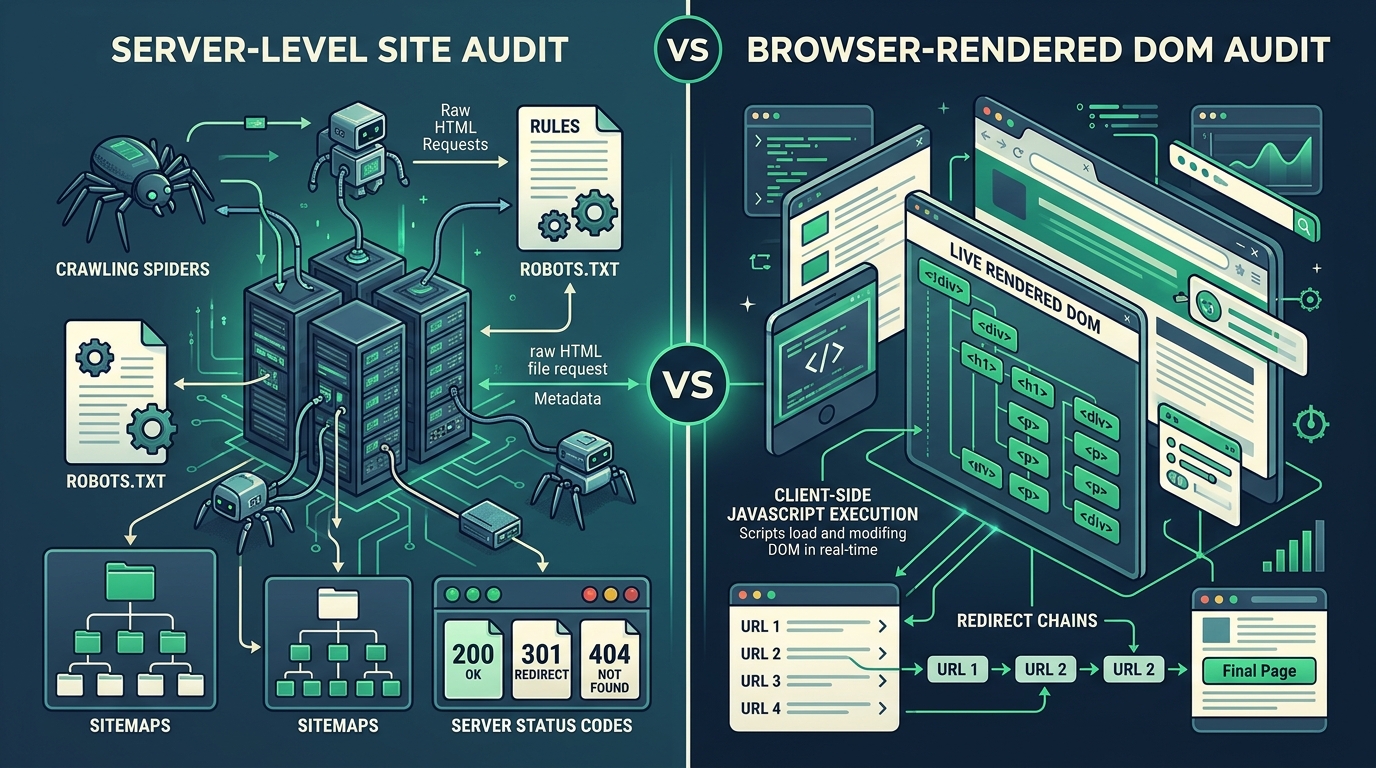
1. Server-Level Crawling vs. Browser-Rendered DOM Audits
A fundamental mistake made by technical SEOs is assuming that what their server spits out over an initial HTTP GET request is what search engines actually index. There are two entirely distinct layers to any website:
The static HTML payload delivered over port 443. Evaluated by traditional command-line crawlers like Screaming Frog or server logs. It contains initial server response headers, static markup, and linked external script assets.
The live document object model after CSS parsing, JavaScript bundle execution, and client-side hydration. This is the exact state analyzed by Googlebot's Web Rendering Service (WRS) and in-browser diagnostic extensions.
If your website utilizes WordPress Gutenberg dynamic blocks, Next.js hydration, React hydration, or client-side affiliate redirection plugins (e.g. Lasso, Pretty Links, ThirstyAffiliates), raw server crawlers will completely miss outbound commercial anchor attributes and dynamically injected disclosures.
2. The Foundation: robots.txt Rules & XML Sitemap Health
Before Googlebot ever loads a single byte of content, it queries https://yourdomain.com/robots.txt. Technical site audits must inspect:
- Accidental Disallow Directives: Patterns like
Disallow: /wp-content/uploads/orDisallow: /*?that prevent Googlebot from rendering critical CSS/JS assets or product pages. - XML Sitemap Declaration: Ensuring your sitemap URL is declared cleanly at the base of the file:
Sitemap: https://yourdomain.com/sitemap.xml. - Orphan URL Prevention: Making sure every single canonical URL in the sitemap is linked from an indexable parent page in your HTML navigation.
3. The Two-Wave Indexing Trap: Client-Side JS & DOM Hydration
Google indexes web pages in two distinct waves:
- Wave 1 (Instant Crawl): Googlebot downloads the raw HTML and indexes static text instantly.
- Wave 2 (Deferred Render): The URL is added to a processing queue where Googlebot spins up a headless Chromium instance to execute JavaScript, render CSS, and discover dynamically generated links.
4. Redirect Loops, 301 Chains & Crawl Budget Exhaustion
Every HTTP redirect consumes crawl budget and degrades user experience. When inspecting outbound commercial links, multi-hop chains are notoriously prevalent:
→ http://merchant.com/aff_c?offer_id=99 → 302
→ https://www.merchant.com/en-us/store/product?ref=old → 200 OK
5. Real-Time DOM Inspection: How AffiScope Bridges the Gap
AffiScope was specifically architected to bridge the divide between server files and the live rendered browser environment. Running as a Manifest V3 extension with an isolated Shadow DOM HUD, AffiScope:
- Traverses Rendered DOM Nodes: Inspects computed CSS, heading structures, and link attributes regardless of whether they were server-rendered or injected by dynamic frameworks.
- Background HEAD Pings: Fires non-blocking network requests through service workers to detect dead 404 targets, suppressed Amazon ASINs, and broken redirect loops in milliseconds.
- FTC DOM Math: Calculates document position metrics to ensure disclosures legally precede commercial links in the rendered viewport.
6. Master Technical Website Audit Checklist
Diagnose Technical Issues Before Rankings Slip
Do not leave your search performance to chance or wait for Google Search Console error emails. You can complete your technical validation with an actionable website audit checklist powered by live browser inspection and zero-latency diagnostics.
Uncover hidden crawl & DOM errors today
Install AffiScope on Google Chrome to audit live rendered DOM, uncloak redirects, and ensure 100% compliance.